
Make a web site icon on your desktop
Make a web site icon on your desktop
Steps
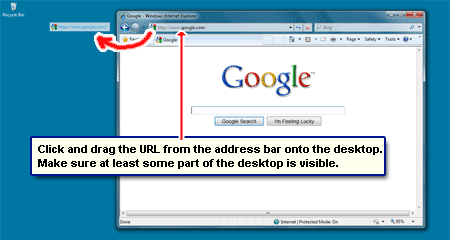
1.Open the site you want to make shortcut
2.Minimize the window as shown in the below picture
3.Drag the favicon icon in to Desktop as shown in picture

Saudi King in ROWLA SHAREEF
Saudi King in ROWLA SHAREEF
King of Saudi Arabia Abdulla bin Abdul Azeez Al-suood, visiting ROWLA SHAREEF
See this Picture

See this Picture

See this Video
YES, NOW You can EDIT any WEB SITE
YES, Now You can EDIT any WEB SITE
Now just click anywhere and start editing the site.
This is really easy and pretty fun to impress friends with.
- Go to any website
- Delete the URL and replace it with below script and press Enter
- Go to any website
- Delete the URL and replace it with below script and press Enter
javascript: document.body.contentEditable= "true"; document.designMode= "on"; void 0
101 Languages of the World
101 Languages of the World
 Windows Sofware
101 Languages of the World (Retail)
DVD Iso
1.04 GB Compress - 2.39 GB UnCompress
More info: http://www.amazon.co.uk/101-Language.../dp/B00004UFGD
Details:
Learning to speak another language has never been easier, quicker or more fun.
Right from the start learners of any level-even complete beginners-can start using a foreign language with this unique learning system.
Languages of the World teaches you to use real language, in context, using the widest variety of interactive activities available from any multi-language learning product today.
Learning is as Easy as One, Two, Three!
1. Tune your ear and build your comprehension with Languages of the World's many games and listening activities,
2. Perfect Your Speaking Skill with the most advanced pronunciation analysis available, and
3. Participate in Real Dialogs to Learn to Speak Like a Native.
Features:
- 140,000 words and 25,000 phrases (That's up to 5,000 words and 100's of sentences per language!).
- Fully Integrated native Speaker sound for every word and sentence.
- Advanced speech analysis to speak like a native.
- Record, Playback, and Compare.
- Interactive Games.
- Listen & Speak activities.
- Personal Progress Tracking.
- Slow Sound to develop listening skills.
- And Much More!...
- Languages of the World also includes a FREE Multilingual word processor.
DISC 1:
Brazilian Portuguese
French
German
Italian
Latin
Polish
Russian
Swedish
and Unitype Global Writer: ( for Windows Only)
Vocabulary of the World Languages:
Asturian
Aymara
Bemba
Blackfoot
Cebuano
Chamorro
Cornish
Ecuadorian Quechua
Faroese
Frisian
Inuktitut
Kongo
Skopiana
Maori
Maya
Mohawk
Nahuatl
Papago
Provençal
Romany
Romansch
Ruanda
Samoan
Sepedi
Shona
Sicilian
Sorbian
Swazi
Tongan
In addition to providing full support for 76 languages,
Languages of the World also includes Vocabulary of the World-a revolutionary flashcard program that lets learners quickly build vocabulary in any of 25 additional world languages.
DISC 2:
Arabic*
Chinese*
Czech
Danish
English for Spanish Speakers
Finnish
Greek*
Hebrew*
Indonesian
Irish
Japanese*
Korean*
Norwegian
Portuguese, European
Romanian
Swahili
Tagalog
Thai*
Turkish
Ukrainian
DISC 3:
Albanian
Azerbaijani
Basque
Belorussian
Bengali*
Bulgarian
Canadian French
Catalan
Croatian
Esperanto
Estonian
Farsi*
Haitian Creole
Hindi*
Hungarian
Latvian
Lithuanian
Quechua
Scottish Gaelic
Serbian
Urdu*
Vietnamese
Yiddish*
Zulu
DISC 4:
Afrikaans
Breton
Dutch
Flemish
Galician
Guarani
Hawaiian
Icelandic
Luganda
Luxembourgish
Malagasy
Malay
Pidgin English
Slovak
Slovene
Somali
Sotho
Spanish
Tahitian
Tswana
Welsh
Wolof
Xhosa
Yoruba
*Some languages normally use character sets different from English.
To simplify the new learner's task, Languages of the World presents these languages using the
Roman alphabet.
**************************
Installation Instructions:
1. Burn to CDs (4 of them)
2. Install.
*******************
Alternative method:
1. Mount .ISO files with whatever you use to mount .ISO files
(Magic ISO, Power ISO, Super Ultra Mega X ISO, Virtual Clone Drive << free and easy etc).
2. Install.
*************************
Other Alternative method:
1. Unpack .ISO files with whatever you use to unpack .ISO files, ex. WinRar / UltraISO etc.
2. Install.
Also, this is the retail version, but there's no required product activation (just some junk to go through if you want to get spammed with all the other "amazing deals" these folks are offering. You don't.)
System Requirements:
PC:
Pentium processor or faster
Microsoft Windows 95/98/2000/NT 4.0 with Service Pack 3.0 or later
32 MB RAM
60 MB hard disk space
2x CD ROM drive
VGA monitor with support for High Color or True Color settings and at least 800 x 600 resolution
Sound card
Speakers
Microphone required for recording
Browser and Internet connection required to link to online resources
Macintosh:
PowerPC or faster
OS System 7.5.5 or later
16 MB RAM
60 MB hard disk space
2x CD ROM drive
VGA monitor with support for High Color or True Color settings and at least 800 x 600 resolution
Microphone required for recording
Browser and Internet connection required to link to online resources
Downloading Links
http://ugotfile.com/file/601425/SPVN.101.Languages.Of.The.World.part01.rar?rid=23321
http://ugotfile.com/file/601429/SPVN.101.Languages.Of.The.World.part02.rar?rid=23321
http://ugotfile.com/file/601431/SPVN.101.Languages.Of.The.World.part03.rar?rid=23321
http://ugotfile.com/file/601436/SPVN.101.Languages.Of.The.World.part04.rar?rid=23321
http://ugotfile.com/file/601440/SPVN.101.Languages.Of.The.World.part05.rar?rid=23321
http://ugotfile.com/file/601437/SPVN.101.Languages.Of.The.World.part06.rar?rid=23321
http://ugotfile.com/file/601444/SPVN.101.Languages.Of.The.World.part07.rar?rid=23321
http://ugotfile.com/file/601441/SPVN.101.Languages.Of.The.World.part08.rar?rid=23321
http://ugotfile.com/file/601439/SPVN.101.Languages.Of.The.World.part09.rar?rid=23321
http://ugotfile.com/file/601446/SPVN.101.Languages.Of.The.World.part10.rar?rid=23321
http://ugotfile.com/file/601442/SPVN.101.Languages.Of.The.World.part11.rar?rid=23321
http://ugotfile.com/file/601443/SPVN.101.Languages.Of.The.World.part12.rar?rid=23321

101 Languages of the World (Retail)
DVD Iso
1.04 GB Compress - 2.39 GB UnCompress
More info: http://www.amazon.co.uk/101-Language.../dp/B00004UFGD
Details:
Learning to speak another language has never been easier, quicker or more fun.
Right from the start learners of any level-even complete beginners-can start using a foreign language with this unique learning system.
Languages of the World teaches you to use real language, in context, using the widest variety of interactive activities available from any multi-language learning product today.
Learning is as Easy as One, Two, Three!
1. Tune your ear and build your comprehension with Languages of the World's many games and listening activities,
2. Perfect Your Speaking Skill with the most advanced pronunciation analysis available, and
3. Participate in Real Dialogs to Learn to Speak Like a Native.
Features:
- 140,000 words and 25,000 phrases (That's up to 5,000 words and 100's of sentences per language!).
- Fully Integrated native Speaker sound for every word and sentence.
- Advanced speech analysis to speak like a native.
- Record, Playback, and Compare.
- Interactive Games.
- Listen & Speak activities.
- Personal Progress Tracking.
- Slow Sound to develop listening skills.
- And Much More!...
- Languages of the World also includes a FREE Multilingual word processor.
DISC 1:
Brazilian Portuguese
French
German
Italian
Latin
Polish
Russian
Swedish
and Unitype Global Writer: ( for Windows Only)
Vocabulary of the World Languages:
Asturian
Aymara
Bemba
Blackfoot
Cebuano
Chamorro
Cornish
Ecuadorian Quechua
Faroese
Frisian
Inuktitut
Kongo
Skopiana
Maori
Maya
Mohawk
Nahuatl
Papago
Provençal
Romany
Romansch
Ruanda
Samoan
Sepedi
Shona
Sicilian
Sorbian
Swazi
Tongan
In addition to providing full support for 76 languages,
Languages of the World also includes Vocabulary of the World-a revolutionary flashcard program that lets learners quickly build vocabulary in any of 25 additional world languages.
DISC 2:
Arabic*
Chinese*
Czech
Danish
English for Spanish Speakers
Finnish
Greek*
Hebrew*
Indonesian
Irish
Japanese*
Korean*
Norwegian
Portuguese, European
Romanian
Swahili
Tagalog
Thai*
Turkish
Ukrainian
DISC 3:
Albanian
Azerbaijani
Basque
Belorussian
Bengali*
Bulgarian
Canadian French
Catalan
Croatian
Esperanto
Estonian
Farsi*
Haitian Creole
Hindi*
Hungarian
Latvian
Lithuanian
Quechua
Scottish Gaelic
Serbian
Urdu*
Vietnamese
Yiddish*
Zulu
DISC 4:
Afrikaans
Breton
Dutch
Flemish
Galician
Guarani
Hawaiian
Icelandic
Luganda
Luxembourgish
Malagasy
Malay
Pidgin English
Slovak
Slovene
Somali
Sotho
Spanish
Tahitian
Tswana
Welsh
Wolof
Xhosa
Yoruba
*Some languages normally use character sets different from English.
To simplify the new learner's task, Languages of the World presents these languages using the
Roman alphabet.
**************************
Installation Instructions:
1. Burn to CDs (4 of them)
2. Install.
*******************
Alternative method:
1. Mount .ISO files with whatever you use to mount .ISO files
(Magic ISO, Power ISO, Super Ultra Mega X ISO, Virtual Clone Drive << free and easy etc).
2. Install.
*************************
Other Alternative method:
1. Unpack .ISO files with whatever you use to unpack .ISO files, ex. WinRar / UltraISO etc.
2. Install.
Also, this is the retail version, but there's no required product activation (just some junk to go through if you want to get spammed with all the other "amazing deals" these folks are offering. You don't.)
System Requirements:
PC:
Pentium processor or faster
Microsoft Windows 95/98/2000/NT 4.0 with Service Pack 3.0 or later
32 MB RAM
60 MB hard disk space
2x CD ROM drive
VGA monitor with support for High Color or True Color settings and at least 800 x 600 resolution
Sound card
Speakers
Microphone required for recording
Browser and Internet connection required to link to online resources
Macintosh:
PowerPC or faster
OS System 7.5.5 or later
16 MB RAM
60 MB hard disk space
2x CD ROM drive
VGA monitor with support for High Color or True Color settings and at least 800 x 600 resolution
Microphone required for recording
Browser and Internet connection required to link to online resources
Downloading Links
http://ugotfile.com/file/601425/SPVN.101.Languages.Of.The.World.part01.rar?rid=23321
http://ugotfile.com/file/601429/SPVN.101.Languages.Of.The.World.part02.rar?rid=23321
http://ugotfile.com/file/601431/SPVN.101.Languages.Of.The.World.part03.rar?rid=23321
http://ugotfile.com/file/601436/SPVN.101.Languages.Of.The.World.part04.rar?rid=23321
http://ugotfile.com/file/601440/SPVN.101.Languages.Of.The.World.part05.rar?rid=23321
http://ugotfile.com/file/601437/SPVN.101.Languages.Of.The.World.part06.rar?rid=23321
http://ugotfile.com/file/601444/SPVN.101.Languages.Of.The.World.part07.rar?rid=23321
http://ugotfile.com/file/601441/SPVN.101.Languages.Of.The.World.part08.rar?rid=23321
http://ugotfile.com/file/601439/SPVN.101.Languages.Of.The.World.part09.rar?rid=23321
http://ugotfile.com/file/601446/SPVN.101.Languages.Of.The.World.part10.rar?rid=23321
http://ugotfile.com/file/601442/SPVN.101.Languages.Of.The.World.part11.rar?rid=23321
http://ugotfile.com/file/601443/SPVN.101.Languages.Of.The.World.part12.rar?rid=23321
Who Used Your Pc In Your Absence,what Did He Do?
Who Used Your Pc In Your Absence,what Did He Do?
double click on the eg: info n it will show u the detail.
You can also use this log to see how long someone was on the computer. Just look at the time the computer was turned on and off for that day.
start > run >eventvwr.msc
Events are stored in three log files: Application, Security, and System. These logs can be reviewed and archived.
For our purposes we want the System log. Click on "System" in the left-hand column for a list of events.
Look for a date and time when you weren't home and your computer should have been off.
Events are stored in three log files: Application, Security, and System. These logs can be reviewed and archived.
For our purposes we want the System log. Click on "System" in the left-hand column for a list of events.
Look for a date and time when you weren't home and your computer should have been off.
double click on the eg: info n it will show u the detail.
You can also use this log to see how long someone was on the computer. Just look at the time the computer was turned on and off for that day.
Showing Super Hidden Files
Showing Super Hidden Files
Even with the Folder options configured to show hidden files, there are super hidden files that you still can't see.
To view them:
1. Start Regedit
2. Go to HKEY_CURRENT_USER \ Software \ Microsoft \ Windows \ CurrentVersion \ Explorer \ Advanced
3. In the right hand panel, scroll to SuperHidden
4. Change the value to 1
5. Reboot
To view them:
1. Start Regedit
2. Go to HKEY_CURRENT_USER \ Software \ Microsoft \ Windows \ CurrentVersion \ Explorer \ Advanced
3. In the right hand panel, scroll to SuperHidden
4. Change the value to 1
5. Reboot
Internet Error Codes
Internet Error Codes
The codes can generally by grouped as follows -
100-199 - Information Codes. Provide information about the request or the servers involved.
200-299 - Success Codes. Indicate that the request was accepted or the requested file has no content (empty).
300-399 - Redirects. Requested content has moved.
400-499 - Client Errors. Cannot find content or you don't have the correct permissions to access it.
500-599 - Server Errors. There is a problem at the server end stopping the request from completing successfully.
To give you a greater understanding of these errors, here is a list of the most popular codes.
As a rule of thumb, the first thing you should if you get an error is make sure that you have typed in the URL or page address correctly.
Bad request 400
The request could not be understood by the server due to bad syntax. You should not repeat the request without modifications.
Unauthorized 401
The creators of a Web page may want only certain people have access to that page. You should only retry the request if you know that you have authorization.
PaymentRequired 402
This message gives a specification of charging schemes which are acceptable. You may retry the request with a suitable ChargeTo header.
Forbidden 403
The request is for something forbidden. Authorization will not help. This status code is commonly used when the server does not wish to reveal exactly why the request has been refused, or when no other response is applicable. (The file needs to be set with "read permissions" for all users.)
Not found 404
The server has not found anything matching what you requested. Make sure that the Web address (URL) that you typed in exactly matches the address you were given. Check that the capitalization matches, spelling, and punctuation, like dots (.) and slashes (/), are correctly placed. Be sure you are using the forward slash (/) and not the backward slash (\).
405 Method Not Allowed
The method specified in the Request-Line is not allowed for the resource identified by the request. The response must include an Allow header containing a list of valid methods for the requested resource.
406 Not Acceptable
The resource identified by the request is only capable of generating response entities which have content characteristics not acceptable according to the accept headers sent in the request.
407 Proxy Authentication Required
This code is similar to 401 (Unauthorized) , but indicates that you must first authenticate yourself with the proxy. The proxy must return a Proxy-Authenticate header field (section 14.33) containing a challenge applicable to the proxy for the requested resource. You may repeat the request with a suitable Proxy-Authorization header field (section 14.34). HTTP access authentication is explained in section 11.
408 Request Timeout
The client did not produce a request within the time that the server was prepared to wait. You may repeat the request without modifications at any later time.
409 Conflict
The request could not be completed due to a conflict with the current state of the resource. This code is only allowed in situations where it is expected that the user might be able to resolve the conflict and resubmit the request.
410 Gone
The 410 response is primarily intended to assist the task of web maintenance by notifying the recipient that the resource is intentionally unavailable and that the server owners want remote links to that resource be removed.
411 Length Required
The server refuses to accept the request without a defined Content- Length. The client may repeat the request if it adds a valid Content-Length header field containing the length of the message-body in the request message.
412 Precondition Failed
The precondition given in one or more of the request-header fields evaluated to false when it was tested on the server. This response code allows the client to place preconditions on the current resource metainformation (header field data) and thus prevent the requested method from being applied to a resource other than the one intended.
413 Request Entity Too Large
The server is refusing to process a request because the request entity is larger than the server is willing or able to process. The server may close the connection to prevent the client from continuing the request.
414 Request-URI Too Long
The server is refusing to service the request because the Request-URI is longer than the server is willing to interpret.
415 Unsupported Media Type
The server is refusing to service the request because the entity of the request is in a format not supported by the requested resource for the requested method.
Internal Error 500
The server encountered an unexpected condition which prevented it from fulfilling the request. Your request could not be processed due to an internal server error.
Not implemented 501 The server does not support the functionality required to fulfill the request. This is the appropriate response when the server does not recognize the request method and is not capable of supporting it for any resource.
502 Bad Gateway
The server, while acting as a gateway or proxy, received an invalid response from the upstream server it accessed in attempting to fulfill the request.
503 Service Unavailable
The server is currently unable to handle the request due to a temporary overloading or maintenance of the server. The implication is that this is a temporary condition which will be alleviated after some delay. If known, the length of the delay may be indicated in a Retry-After header. If no Retry-After is given, you should handle the response as it would for a 500 response.
504 Gateway Timeout
The server, while acting as a gateway or proxy, did not receive a timely response from the upstream server it accessed in attempting to complete the request.
505 HTTP Version Not Supported
The server does not support, or refuses to support, the HTTP protocol version that was used in the request message. The response should contain an entity describing why that version is not supported and what other protocols are supported by that server.
The codes can generally by grouped as follows -
100-199 - Information Codes. Provide information about the request or the servers involved.
200-299 - Success Codes. Indicate that the request was accepted or the requested file has no content (empty).
300-399 - Redirects. Requested content has moved.
400-499 - Client Errors. Cannot find content or you don't have the correct permissions to access it.
500-599 - Server Errors. There is a problem at the server end stopping the request from completing successfully.
To give you a greater understanding of these errors, here is a list of the most popular codes.
As a rule of thumb, the first thing you should if you get an error is make sure that you have typed in the URL or page address correctly.
Bad request 400
The request could not be understood by the server due to bad syntax. You should not repeat the request without modifications.
Unauthorized 401
The creators of a Web page may want only certain people have access to that page. You should only retry the request if you know that you have authorization.
PaymentRequired 402
This message gives a specification of charging schemes which are acceptable. You may retry the request with a suitable ChargeTo header.
Forbidden 403
The request is for something forbidden. Authorization will not help. This status code is commonly used when the server does not wish to reveal exactly why the request has been refused, or when no other response is applicable. (The file needs to be set with "read permissions" for all users.)
Not found 404
The server has not found anything matching what you requested. Make sure that the Web address (URL) that you typed in exactly matches the address you were given. Check that the capitalization matches, spelling, and punctuation, like dots (.) and slashes (/), are correctly placed. Be sure you are using the forward slash (/) and not the backward slash (\).
405 Method Not Allowed
The method specified in the Request-Line is not allowed for the resource identified by the request. The response must include an Allow header containing a list of valid methods for the requested resource.
406 Not Acceptable
The resource identified by the request is only capable of generating response entities which have content characteristics not acceptable according to the accept headers sent in the request.
407 Proxy Authentication Required
This code is similar to 401 (Unauthorized) , but indicates that you must first authenticate yourself with the proxy. The proxy must return a Proxy-Authenticate header field (section 14.33) containing a challenge applicable to the proxy for the requested resource. You may repeat the request with a suitable Proxy-Authorization header field (section 14.34). HTTP access authentication is explained in section 11.
408 Request Timeout
The client did not produce a request within the time that the server was prepared to wait. You may repeat the request without modifications at any later time.
409 Conflict
The request could not be completed due to a conflict with the current state of the resource. This code is only allowed in situations where it is expected that the user might be able to resolve the conflict and resubmit the request.
410 Gone
The 410 response is primarily intended to assist the task of web maintenance by notifying the recipient that the resource is intentionally unavailable and that the server owners want remote links to that resource be removed.
411 Length Required
The server refuses to accept the request without a defined Content- Length. The client may repeat the request if it adds a valid Content-Length header field containing the length of the message-body in the request message.
412 Precondition Failed
The precondition given in one or more of the request-header fields evaluated to false when it was tested on the server. This response code allows the client to place preconditions on the current resource metainformation (header field data) and thus prevent the requested method from being applied to a resource other than the one intended.
413 Request Entity Too Large
The server is refusing to process a request because the request entity is larger than the server is willing or able to process. The server may close the connection to prevent the client from continuing the request.
414 Request-URI Too Long
The server is refusing to service the request because the Request-URI is longer than the server is willing to interpret.
415 Unsupported Media Type
The server is refusing to service the request because the entity of the request is in a format not supported by the requested resource for the requested method.
Internal Error 500
The server encountered an unexpected condition which prevented it from fulfilling the request. Your request could not be processed due to an internal server error.
Not implemented 501 The server does not support the functionality required to fulfill the request. This is the appropriate response when the server does not recognize the request method and is not capable of supporting it for any resource.
502 Bad Gateway
The server, while acting as a gateway or proxy, received an invalid response from the upstream server it accessed in attempting to fulfill the request.
503 Service Unavailable
The server is currently unable to handle the request due to a temporary overloading or maintenance of the server. The implication is that this is a temporary condition which will be alleviated after some delay. If known, the length of the delay may be indicated in a Retry-After header. If no Retry-After is given, you should handle the response as it would for a 500 response.
504 Gateway Timeout
The server, while acting as a gateway or proxy, did not receive a timely response from the upstream server it accessed in attempting to complete the request.
505 HTTP Version Not Supported
The server does not support, or refuses to support, the HTTP protocol version that was used in the request message. The response should contain an entity describing why that version is not supported and what other protocols are supported by that server.
Multiple Logins on Gtalk
Multiple Logins on Gtalk
1. Right-click GTalk shortcut and select Properties.
2. The shortcut properties dialog box as shown below should popup.
3. Just add /nomutex to the existing textEg: "C:\Program Files\Google\Google Talk\googletalk.exe"/nomutex
4. Now you can launch multiple windows and use different ID's
1. Right-click GTalk shortcut and select Properties.
2. The shortcut properties dialog box as shown below should popup.
3. Just add /nomutex to the existing textEg: "C:\Program Files\Google\Google Talk\googletalk.exe"/nomutex
4. Now you can launch multiple windows and use different ID's
Google Search Tips
Google Search Tips
1. Explicit Phrase:
Lets say you are looking for content about internet marketing. Instead of just typing internet marketing into the Google search box, you will likely be better off searching explicitly for the phrase. To do this, simply enclose the search phrase within double quotes.
Example: "internet marketing"
2. Exclude Words:
Lets say you want to search for content about internet marketing, but you want to exclude any results that contain the term advertising. To do this, simply use the "-" sign in front of the word you want to exclude.
Example Search: internet marketing -advertising
3. Site Specific Search:
Often, you want to search a specific website for content that matches a certain phrase. Even if the site doesn’t support a built-in search feature, you can use Google to search the site for your term. Simply use the "site:somesite.com" modifier.
Example: "internet marketing" site:Internet Marketing Blog
4. Similar Words and Synonyms:
Let’s say you are want to include a word in your search, but want to include results that contain similar words or synonyms. To do this, use the "~" in front of the word.
Example: "internet marketing" ~professional
5. Specific Document Types:
If you’re looking to find results that are of a specific type, you can use the modifier "filetype:". For example, you might want to find only PowerPoint presentations related to internet marketing.
Example: "internet marketing" filetypept
6. This OR That:
By default, when you do a search, Google will include all the terms specified in the search. If you are looking for any one of one or more terms to match, then you can use the OR operator. (Note: The OR has to be capitalized).
Example: internet marketing OR advertising
7. Phone Listing:
Let’s say someone calls you on your mobile number and you don’t know how it is. If all you have is a phone number, you can look it up on Google using the phonebook feature.
Example: phonebook:617-555-1212 (note: the provided number does not work – you’ll have to use a real number to get any results).
8. Area Code Lookup:
If all you need to do is to look-up the area code for a phone number, just enter the 3-digit area code and Google will tell you where it’s from.
Example: 617
9. Numeric Ranges:
This is a rarely used, but highly useful tip. Let’s say you want to find results that contain any of a range of numbers. You can do this by using the X..Y modifier (in case this is hard to read, what’s between the X and Y are two periods. This type of search is useful for years (as shown below), prices or anywhere where you want to provide a series of numbers.
Example: president 1940..1950
10. Stock (Ticker Symbol):
Just enter a valid ticker symbol as your search term and Google will give you the current financials and a quick thumb-nail chart for the stock.
Example: GOOG
11. Calculator:
The next time you need to do a quick calculation, instead of bringing up the Calculator applet, you can just type your expression in to Google.
Example: 48512 * 1.02
12. Word Definitions:
If you need to quickly look up the definition of a word or phrase, simply use the "define:" command.
Example: definelethora
Lets say you are looking for content about internet marketing. Instead of just typing internet marketing into the Google search box, you will likely be better off searching explicitly for the phrase. To do this, simply enclose the search phrase within double quotes.
Example: "internet marketing"
2. Exclude Words:
Lets say you want to search for content about internet marketing, but you want to exclude any results that contain the term advertising. To do this, simply use the "-" sign in front of the word you want to exclude.
Example Search: internet marketing -advertising
3. Site Specific Search:
Often, you want to search a specific website for content that matches a certain phrase. Even if the site doesn’t support a built-in search feature, you can use Google to search the site for your term. Simply use the "site:somesite.com" modifier.
Example: "internet marketing" site:Internet Marketing Blog
4. Similar Words and Synonyms:
Let’s say you are want to include a word in your search, but want to include results that contain similar words or synonyms. To do this, use the "~" in front of the word.
Example: "internet marketing" ~professional
5. Specific Document Types:
If you’re looking to find results that are of a specific type, you can use the modifier "filetype:". For example, you might want to find only PowerPoint presentations related to internet marketing.
Example: "internet marketing" filetypept
6. This OR That:
By default, when you do a search, Google will include all the terms specified in the search. If you are looking for any one of one or more terms to match, then you can use the OR operator. (Note: The OR has to be capitalized).
Example: internet marketing OR advertising
7. Phone Listing:
Let’s say someone calls you on your mobile number and you don’t know how it is. If all you have is a phone number, you can look it up on Google using the phonebook feature.
Example: phonebook:617-555-1212 (note: the provided number does not work – you’ll have to use a real number to get any results).
8. Area Code Lookup:
If all you need to do is to look-up the area code for a phone number, just enter the 3-digit area code and Google will tell you where it’s from.
Example: 617
9. Numeric Ranges:
This is a rarely used, but highly useful tip. Let’s say you want to find results that contain any of a range of numbers. You can do this by using the X..Y modifier (in case this is hard to read, what’s between the X and Y are two periods. This type of search is useful for years (as shown below), prices or anywhere where you want to provide a series of numbers.
Example: president 1940..1950
10. Stock (Ticker Symbol):
Just enter a valid ticker symbol as your search term and Google will give you the current financials and a quick thumb-nail chart for the stock.
Example: GOOG
11. Calculator:
The next time you need to do a quick calculation, instead of bringing up the Calculator applet, you can just type your expression in to Google.
Example: 48512 * 1.02
12. Word Definitions:
If you need to quickly look up the definition of a word or phrase, simply use the "define:" command.
Example: definelethora
Current Date n Time in Notepad
Current Date n Time in Notepad
Sometimes we want to insert current date and time, whenever we open the file in the notepad. Here is a trick to do this. Just add a .LOG in the first line of your text file and close it.(remember type .LOG in caps )
Whenever you open the file with that text in the first line in the notepad, it will insert the current date and time at the end of the file. You can start entering your text after that.
Whenever you open the file with that text in the first line in the notepad, it will insert the current date and time at the end of the file. You can start entering your text after that.
Google secrets Type on google:
Google secrets Type on google:
Google Gothic
Google in gothic style And then on''I'm Feeling Lucky''> Google in gothic style
Type on google:
Google cheese
And then on''I'm Feeling Lucky''> You'll get google maps of the moon, is up to zoom in and you see a cheese
Typ op google: Type on google:
Google spot
And then on''I'm Feeling Lucky''> and you'll get a feast google
Google Gothic
Google in gothic style And then on''I'm Feeling Lucky''> Google in gothic style
Type on google:
Google cheese
And then on''I'm Feeling Lucky''> You'll get google maps of the moon, is up to zoom in and you see a cheese
Typ op google: Type on google:
Google spot
And then on''I'm Feeling Lucky''> and you'll get a feast google
Remove your Bios Password
Remove your Bios Password
1. Open the CPU
2. Now, observe the motherboard.

3. You notice a coin like silver Battery(3V).
4. Remove the battery from the motherboard.
(It is safe to remove the Battery)
5. Wait 30 seconds and place the battery back on the motherboard.
6. Now, when you start your system you won't be prompted for the BIOS password.
CAUTION: USE THIS METHOD AT YOUR OWN RISK. BUT THIS IS THE ONLY METHOD TO DO
1. Open the CPU
2. Now, observe the motherboard.

3. You notice a coin like silver Battery(3V).
4. Remove the battery from the motherboard.
(It is safe to remove the Battery)
5. Wait 30 seconds and place the battery back on the motherboard.
6. Now, when you start your system you won't be prompted for the BIOS password.
CAUTION: USE THIS METHOD AT YOUR OWN RISK. BUT THIS IS THE ONLY METHOD TO DO
Sql Commands
Sql Commands
ABORT -- abort the current transaction
ALTER DATABASE -- change a database
ALTER GROUP -- add users to a group or remove users from a group
ALTER TABLE -- change the definition of a table
ALTER TRIGGER -- change the definition of a trigger
ALTER USER -- change a database user account
ANALYZE -- collect statistics about a database
BEGIN -- start a transaction block
CHECKPOINT -- force a transaction log checkpoint
CLOSE -- close a cursor
CLUSTER -- cluster a table according to an index
COMMENT -- define or change the comment of an object
COMMIT -- commit the current transaction
COPY -- copy data between files and tables
CREATE AGGREGATE -- define a new aggregate function
CREATE CAST -- define a user-defined cast
CREATE CONSTRAINT TRIGGER -- define a new constraint trigger
CREATE CONVERSION -- define a user-defined conversion
CREATE DATABASE -- create a new database
CREATE DOMAIN -- define a new domain
CREATE FUNCTION -- define a new function
CREATE GROUP -- define a new user group
CREATE INDEX -- define a new index
CREATE LANGUAGE -- define a new procedural language
CREATE OPERATOR -- define a new operator
CREATE OPERATOR CLASS -- define a new operator class for indexes
CREATE RULE -- define a new rewrite rule
CREATE SCHEMA -- define a new schema
CREATE SEQUENCE -- define a new sequence generator
CREATE TABLE -- define a new table
CREATE TABLE AS -- create a new table from the results of a query
CREATE TRIGGER -- define a new trigger
CREATE TYPE -- define a new data type
CREATE USER -- define a new database user account
CREATE VIEW -- define a new view
DEALLOCATE -- remove a prepared query
DECLARE -- define a cursor
DELETE -- delete rows of a table
DROP AGGREGATE -- remove a user-defined aggregate function
DROP CAST -- remove a user-defined cast
DROP CONVERSION -- remove a user-defined conversion
DROP DATABASE -- remove a database
DROP DOMAIN -- remove a user-defined domain
DROP FUNCTION -- remove a user-defined function
DROP GROUP -- remove a user group
DROP INDEX -- remove an index
DROP LANGUAGE -- remove a user-defined procedural language
DROP OPERATOR -- remove a user-defined operator
DROP OPERATOR CLASS -- remove a user-defined operator class
DROP RULE -- remove a rewrite rule
DROP SCHEMA -- remove a schema
DROP SEQUENCE -- remove a sequence
DROP TABLE -- remove a table
DROP TRIGGER -- remove a trigger
DROP TYPE -- remove a user-defined data type
DROP USER -- remove a database user account
DROP VIEW -- remove a view
END -- commit the current transaction
EXECUTE -- execute a prepared query
EXPLAIN -- show the execution plan of a statement
FETCH -- retrieve rows from a table using a cursor
GRANT -- define access privileges
INSERT -- create new rows in a table
LISTEN -- listen for a notification
LOAD -- load or reload a shared library file
LOCK -- explicitly lock a table
MOVE -- position a cursor on a specified row of a table
NOTIFY -- generate a notification
PREPARE -- create a prepared query
REINDEX -- rebuild corrupted indexes
RESET -- restore the value of a run-time parameter to a default value
REVOKE -- remove access privileges
ROLLBACK -- abort the current transaction
SELECT -- retrieve rows from a table or view
SELECT INTO -- create a new table from the results of a query
SET -- change a run-time parameter
SET CONSTRAINTS -- set the constraint mode of the current transaction
SET SESSION AUTHORIZATION -- set the session user identifier and the current user identifier of the current session
SET TRANSACTION -- set the characteristics of the current transaction
SHOW -- show the value of a run-time parameter
START TRANSACTION -- start a transaction block
TRUNCATE -- empty a table
UNLISTEN -- stop listening for a notification
UPDATE -- update rows of a table
VACUUM -- garbage-collect and optionally analyze a database
ABORT -- abort the current transaction
ALTER DATABASE -- change a database
ALTER GROUP -- add users to a group or remove users from a group
ALTER TABLE -- change the definition of a table
ALTER TRIGGER -- change the definition of a trigger
ALTER USER -- change a database user account
ANALYZE -- collect statistics about a database
BEGIN -- start a transaction block
CHECKPOINT -- force a transaction log checkpoint
CLOSE -- close a cursor
CLUSTER -- cluster a table according to an index
COMMENT -- define or change the comment of an object
COMMIT -- commit the current transaction
COPY -- copy data between files and tables
CREATE AGGREGATE -- define a new aggregate function
CREATE CAST -- define a user-defined cast
CREATE CONSTRAINT TRIGGER -- define a new constraint trigger
CREATE CONVERSION -- define a user-defined conversion
CREATE DATABASE -- create a new database
CREATE DOMAIN -- define a new domain
CREATE FUNCTION -- define a new function
CREATE GROUP -- define a new user group
CREATE INDEX -- define a new index
CREATE LANGUAGE -- define a new procedural language
CREATE OPERATOR -- define a new operator
CREATE OPERATOR CLASS -- define a new operator class for indexes
CREATE RULE -- define a new rewrite rule
CREATE SCHEMA -- define a new schema
CREATE SEQUENCE -- define a new sequence generator
CREATE TABLE -- define a new table
CREATE TABLE AS -- create a new table from the results of a query
CREATE TRIGGER -- define a new trigger
CREATE TYPE -- define a new data type
CREATE USER -- define a new database user account
CREATE VIEW -- define a new view
DEALLOCATE -- remove a prepared query
DECLARE -- define a cursor
DELETE -- delete rows of a table
DROP AGGREGATE -- remove a user-defined aggregate function
DROP CAST -- remove a user-defined cast
DROP CONVERSION -- remove a user-defined conversion
DROP DATABASE -- remove a database
DROP DOMAIN -- remove a user-defined domain
DROP FUNCTION -- remove a user-defined function
DROP GROUP -- remove a user group
DROP INDEX -- remove an index
DROP LANGUAGE -- remove a user-defined procedural language
DROP OPERATOR -- remove a user-defined operator
DROP OPERATOR CLASS -- remove a user-defined operator class
DROP RULE -- remove a rewrite rule
DROP SCHEMA -- remove a schema
DROP SEQUENCE -- remove a sequence
DROP TABLE -- remove a table
DROP TRIGGER -- remove a trigger
DROP TYPE -- remove a user-defined data type
DROP USER -- remove a database user account
DROP VIEW -- remove a view
END -- commit the current transaction
EXECUTE -- execute a prepared query
EXPLAIN -- show the execution plan of a statement
FETCH -- retrieve rows from a table using a cursor
GRANT -- define access privileges
INSERT -- create new rows in a table
LISTEN -- listen for a notification
LOAD -- load or reload a shared library file
LOCK -- explicitly lock a table
MOVE -- position a cursor on a specified row of a table
NOTIFY -- generate a notification
PREPARE -- create a prepared query
REINDEX -- rebuild corrupted indexes
RESET -- restore the value of a run-time parameter to a default value
REVOKE -- remove access privileges
ROLLBACK -- abort the current transaction
SELECT -- retrieve rows from a table or view
SELECT INTO -- create a new table from the results of a query
SET -- change a run-time parameter
SET CONSTRAINTS -- set the constraint mode of the current transaction
SET SESSION AUTHORIZATION -- set the session user identifier and the current user identifier of the current session
SET TRANSACTION -- set the characteristics of the current transaction
SHOW -- show the value of a run-time parameter
START TRANSACTION -- start a transaction block
TRUNCATE -- empty a table
UNLISTEN -- stop listening for a notification
UPDATE -- update rows of a table
VACUUM -- garbage-collect and optionally analyze a database
Last shutdown date n time in xp/vista/2003
Last shutdown date n time in xp/vista/2003
The easiest way to determine the last shutdown date/time is to check the event logs. When you shutdown a computer Event ID 6006 is written to the Event log which denotes a clean shutdown. Here is a sample event.
Event Type: Information
Event Source: EventLog
Event Category: None
Event ID: 6006
Date: 9/8/2008
Time: 3:35:20 PM
User: N/A
Computer: MYCOMP
Description:
The Event log service was stopped.
Ref: Windows Event IDs 6005, 6006, 6008, and 6009.
1. Launch Eventvwr.msc to start the Event Viewer.
2. Click System
Note: In Windows Vista, you need to double-click Windows Logs, and select System.
3. Sort the results by Date (descending)
4. Locate the most recent entry with the ID of 6006 and the Source column reading eventlog
5. Note down the date and time of that entry. This is the last shutdown time.
Note: Windows Vista also writes event 1074 (STATUS_SHUTDOWN_CLEAN) when shut down.
Using the registry
Windows also stores the last shutdown date and time in a REG_BINARY value named ShutdownTime in the following branch:
HKEY_LOCAL_MACHINE \ SYSTEM \ CurrentControlSet \ Control \ Windows
To convert the Binary data to readable form, you may use the script from VisualBasicScript.com.
strValueName = "HKLM\SYSTEM\CurrentControlSet\Control\Windows\" _
& "ShutdownTime"
Set oShell = CreateObject("WScript.Shell")
Ar = oShell.RegRead(strValueName)
Term = Ar(7)*(2^56) + Ar(6)*(2^48) + Ar(5)*(2^40) + Ar(4)*(2^32) _
+ Ar(3)*(2^24) + Ar(2)*(2^16) + Ar(1)*(2^8) + Ar(0)
Days = Term/(1E7*86400)
WScript.Echo "ShutdownTime = " & CDate(DateSerial(1601, 1, 1) + Days) _
& " UTC"
Copy the above code to Notepad and save the file with ".vbs" extension. Double-click the script to run it.
Another way is to use the Registry Editor to export the above registry key to a file in .txt format (rather than .reg). This format shows the last write time of the key. When Windows updates the ShutdownTime value, the last write time of the key is updated. This is not a reliable way, as the last write time of a key changes when any other value under that key is
The easiest way to determine the last shutdown date/time is to check the event logs. When you shutdown a computer Event ID 6006 is written to the Event log which denotes a clean shutdown. Here is a sample event.
Event Type: Information
Event Source: EventLog
Event Category: None
Event ID: 6006
Date: 9/8/2008
Time: 3:35:20 PM
User: N/A
Computer: MYCOMP
Description:
The Event log service was stopped.
Ref: Windows Event IDs 6005, 6006, 6008, and 6009.
1. Launch Eventvwr.msc to start the Event Viewer.
2. Click System
Note: In Windows Vista, you need to double-click Windows Logs, and select System.
3. Sort the results by Date (descending)
4. Locate the most recent entry with the ID of 6006 and the Source column reading eventlog
5. Note down the date and time of that entry. This is the last shutdown time.
Note: Windows Vista also writes event 1074 (STATUS_SHUTDOWN_CLEAN) when shut down.
Using the registry
Windows also stores the last shutdown date and time in a REG_BINARY value named ShutdownTime in the following branch:
HKEY_LOCAL_MACHINE \ SYSTEM \ CurrentControlSet \ Control \ Windows
To convert the Binary data to readable form, you may use the script from VisualBasicScript.com.
strValueName = "HKLM\SYSTEM\CurrentControlSet\Control\Windows\" _
& "ShutdownTime"
Set oShell = CreateObject("WScript.Shell")
Ar = oShell.RegRead(strValueName)
Term = Ar(7)*(2^56) + Ar(6)*(2^48) + Ar(5)*(2^40) + Ar(4)*(2^32) _
+ Ar(3)*(2^24) + Ar(2)*(2^16) + Ar(1)*(2^8) + Ar(0)
Days = Term/(1E7*86400)
WScript.Echo "ShutdownTime = " & CDate(DateSerial(1601, 1, 1) + Days) _
& " UTC"
Copy the above code to Notepad and save the file with ".vbs" extension. Double-click the script to run it.
Another way is to use the Registry Editor to export the above registry key to a file in .txt format (rather than .reg). This format shows the last write time of the key. When Windows updates the ShutdownTime value, the last write time of the key is updated. This is not a reliable way, as the last write time of a key changes when any other value under that key is
Enable right click on websites that disables it
Enable right click on websites that disables it
Many websites nowadays disable the right click function of the mouse button which I think could be very annoying sometimes. This is done so that we can’t steal images, file, video, or any other website’s stuff. What about if we extremely in a need of the file without any profit-making and other bad intentions? In this post a tutorial is included to teach you how to solve the problem, without having to open the source code of course!
If you use Internet Explorer 6 and 7
Click “Tools”->”Internet Options”
Click the “Security” tab.
Click “Custom Level”
Scroll down to the “scripting” section.
Set “Active Scripting” to “disable” (Active scripts are programs written in Javascript)
Click “Ok”. Restart your internet browser.
Note: This will disable the Javascript from being rendered by your Internet Explorer browser which would mean the right click disabled’s script in the website will not work anymore.
For Mozilla Firefox browser, these are the steps which gave the same effect (maybe be vary depending on the version).
Go to “Tools” -> “Options”
Click “Web Features”
Untick enable JavaScript
Many websites nowadays disable the right click function of the mouse button which I think could be very annoying sometimes. This is done so that we can’t steal images, file, video, or any other website’s stuff. What about if we extremely in a need of the file without any profit-making and other bad intentions? In this post a tutorial is included to teach you how to solve the problem, without having to open the source code of course!
If you use Internet Explorer 6 and 7
Click “Tools”->”Internet Options”
Click the “Security” tab.
Click “Custom Level”
Scroll down to the “scripting” section.
Set “Active Scripting” to “disable” (Active scripts are programs written in Javascript)
Click “Ok”. Restart your internet browser.
Note: This will disable the Javascript from being rendered by your Internet Explorer browser which would mean the right click disabled’s script in the website will not work anymore.
For Mozilla Firefox browser, these are the steps which gave the same effect (maybe be vary depending on the version).
Go to “Tools” -> “Options”
Click “Web Features”
Untick enable JavaScript
Protect users from writing to USB
Protect users from writing to USB
The following registry setting will prevent writing to usb in windows xp.
Expand HKEY_LOCAL_MACHINE\System\CurrentControlSet\Contro l Add a new key and name it "StorageDevicePolicies".
In the window on the right then create a new DWORD value and label it WriteProtect, give it a value of "1" and users can no longer write to USB drives.
Giving a value of "0" will allow to write again
The following registry setting will prevent writing to usb in windows xp.
Expand HKEY_LOCAL_MACHINE\System\CurrentControlSet\Contro l Add a new key and name it "StorageDevicePolicies".
In the window on the right then create a new DWORD value and label it WriteProtect, give it a value of "1" and users can no longer write to USB drives.
Giving a value of "0" will allow to write again
Auto Delete Temp Folder
Auto Delete Temp Folder
The Temporary Folder is used to store Some Temporary Files,that we uses & It wont Be deleted.Thereby it Wastes a lot of Space and Slow Down your System.So we must Regularly Delete those Files to make our System Run Fast.This Tweak Auto-Deletes the Content of Temporary Folder.After this tweak,Windows Puts a Temp File in that Folder & it will automatically Delete it when Itz Done!!
•Open Group Policy Editor.
•Navigate To Computer Configuration--->Administrative Templates--->Windows Components--->Terminal Services--->Temporary Folder.
•Den,Double Click Do Not Delete Temp Folder Upon Exit and and Disable it.
•Open Group Policy Editor.
•Navigate To Computer Configuration--->Administrative Templates--->Windows Components--->Terminal Services--->Temporary Folder.
•Den,Double Click Do Not Delete Temp Folder Upon Exit and and Disable it.
Change Logo Of Internet Explorer
Change Logo Of Internet Explorer
This Tweak Changes the Small logo at the Top-Right Corner of your Browser.The Logo have to be (22X22) Small and (38X38) Large and have to be bitmap.When you save your Logo,you have to save in 256 or 16bit color.
•Go To Start--->Run and Open Group Policy Editor.(gpedit.msc)
•Navigate To User Configuration--->Windows Setting--->Internet Explorer Maintenance--->Browser User Intererface.
•Double Click on Custom Logo and Animated Bitmaps.
•Click on Customize The Static Logo Bitmaps.
•Click on Browse.
•Browse For your New Logo.
•Click OK.
•An Error will Popup:You have selected to customize a setting but provided no value.The behavior of this will be to delete the setting.Are you sure you want too continue?
This Tweak Changes the Small logo at the Top-Right Corner of your Browser.The Logo have to be (22X22) Small and (38X38) Large and have to be bitmap.When you save your Logo,you have to save in 256 or 16bit color.
•Go To Start--->Run and Open Group Policy Editor.(gpedit.msc)
•Navigate To User Configuration--->Windows Setting--->Internet Explorer Maintenance--->Browser User Intererface.
•Double Click on Custom Logo and Animated Bitmaps.
•Click on Customize The Static Logo Bitmaps.
•Click on Browse.
•Browse For your New Logo.
•Click OK.
•An Error will Popup:You have selected to customize a setting but provided no value.The behavior of this will be to delete the setting.Are you sure you want too continue?
mozilla Tricks
mozilla Tricks
1...chrome://global/content/alerts/alert.xul
IT SHOWS Dancing Firefox.
2...chrome://browser/content/browser.xul
IT Opens another Firefox inside a tab in the the existing Firefox window.
3...chrome://browser/content/preferences/preferences.xul
IT Opens the Options dialog box inside the Firefox tab.
4...chrome://browser/content/bookmarks/bookmarksPanel.xul
IT Opens the “Book Marks Manager” inside a tab in the Firefox window.
5...chrome://browser/content/history/history-panel.xul
IT Opens the History Panel in the Firefox tab.
6...chrome://mozapps/content/extensions/extensions.xul?type=extensions
IT Opens the Extensions window in the current tab.
7...chrome://browser/content/preferences/cookies.xul
IT Opens the “cookies window” inside a tab in the Firefox window.
8...chrome://browser/content/preferences/sanitize.xul
IT Opens the “Clear Private Data” window inside the current tab.
9...chrome://browser/content/aboutDialog.xul
IT Opens the “About Firefox” Dialog box inside the tab.
10...chrome://browser/content/credits.xhtml
IT A scrolling list of names. The one’s who we must thank for creating Firefox
1...chrome://global/content/alerts/alert.xul
IT SHOWS Dancing Firefox.
2...chrome://browser/content/browser.xul
IT Opens another Firefox inside a tab in the the existing Firefox window.
3...chrome://browser/content/preferences/preferences.xul
IT Opens the Options dialog box inside the Firefox tab.
4...chrome://browser/content/bookmarks/bookmarksPanel.xul
IT Opens the “Book Marks Manager” inside a tab in the Firefox window.
5...chrome://browser/content/history/history-panel.xul
IT Opens the History Panel in the Firefox tab.
6...chrome://mozapps/content/extensions/extensions.xul?type=extensions
IT Opens the Extensions window in the current tab.
7...chrome://browser/content/preferences/cookies.xul
IT Opens the “cookies window” inside a tab in the Firefox window.
8...chrome://browser/content/preferences/sanitize.xul
IT Opens the “Clear Private Data” window inside the current tab.
9...chrome://browser/content/aboutDialog.xul
IT Opens the “About Firefox” Dialog box inside the tab.
10...chrome://browser/content/credits.xhtml
IT A scrolling list of names. The one’s who we must thank for creating Firefox
Disabling the Right-Click on the Start Button
Disabling the Right-Click on the Start Button
Normally, when you right button click on the Start button, it allows you to open your programs folder, the Explorer and run Find.
In situations where you don't want to allow users to be able to do this in order to secure your computer.
1.Open RegEdit
2.Search for Desktop
3.This should bring you to HKEY_CLASSES_ROOT\Directory
4.Expand this section
5.Under Shell is Find
6.Delete Find
7.Move down a little in the Registry to Folder
8.Expand this section and remove Explore and Open
Now when you right click on the Start button, nothing should happen.
You can delete only those items that you need.
Note: - On Microsoft keyboards, this also disables the Window-E (for Explorer) and Window-F (for Find) keys
In situations where you don't want to allow users to be able to do this in order to secure your computer.
1.Open RegEdit
2.Search for Desktop
3.This should bring you to HKEY_CLASSES_ROOT\Directory
4.Expand this section
5.Under Shell is Find
6.Delete Find
7.Move down a little in the Registry to Folder
8.Expand this section and remove Explore and Open
Now when you right click on the Start button, nothing should happen.
You can delete only those items that you need.
Note: - On Microsoft keyboards, this also disables the Window-E (for Explorer) and Window-F (for Find) keys
Holiday in Space
Holiday in Space
Pack your holiday gear, your next holiday is in space? It’s not the case for now but in few years time that would be a reality. Good news is engineers at Virgin Galactic is carrying out their testing to get a licence from the Federal Aviation Authority to take off from its New Mexico launch site. Virgin Galactic have already raised $40m worth of deposits from people willing to part with $200,000 to be among the first people to travel to space.
The concept is simple (after all it is not rocket science for a certain level) the space craft which carrying passengers to space called SpaceShipTwo and it’s lifted to higher atmosphere of the earth by it’s mother ship called as VMS Eve. When it’s in correct altitude it’s released from the mother ship & SpaceShipTwo thrusters kick in and it’s launching to space. SpaceShipTwo can return to earth by on it’s own.



SpaceShipTwo (SS2) is a suborbital spaceplane for carrying space tourists, under development by The Spaceship Company, a joint venture between Scaled Composites and Sir Richard Branson’s Virgin Group.

VMS Eve is a carrier mothership for Virgin Galactic and launch platform for SpaceShipTwo based Virgin SpaceShips (VMS). It also functions as a zero-g flight tourist plane.

Sir Richard Branson emperor of the Virgin empire and Burt Rutan is a pioneering American aerospace engineer have teamed up, to make this possible.


Paint.NET 3.5.4
 Paint.NET 3.5.4
Paint.NET is image and photo manipulation software designed to be used on computers that run XP, Server 2003 or Vista.
Every feature and user interface element was designed to be immediately intuitive and quickly learnable without assistance. In order to handle multiple images easily, Paint.NET uses a tabbed document interface. The tabs display a live thumbnail of the image instead of a text description. This makes navigation very simple and fast.
Usually only found on expensive or complicated professional software, layers form the basis for a rich image composition experience. You may think of them as a stack of transparency slides that, when viewed together at the same time, form one image.
Many special effects are included for enhancing and perfecting your images. Everything from blurring, sharpening, red-eye removal, distortion, noise, and embossing are included. Also included is our unique 3D Rotate/Zoom effect that makes it very easy to add perspective and tilting.
Adjustments are also included which help you tweak an image's brightness, contrast, hue, saturation, curves, and levels. You can also convert an image to black and white, or sepia-toned.
Download
Every feature and user interface element was designed to be immediately intuitive and quickly learnable without assistance. In order to handle multiple images easily, Paint.NET uses a tabbed document interface. The tabs display a live thumbnail of the image instead of a text description. This makes navigation very simple and fast.
Usually only found on expensive or complicated professional software, layers form the basis for a rich image composition experience. You may think of them as a stack of transparency slides that, when viewed together at the same time, form one image.
Many special effects are included for enhancing and perfecting your images. Everything from blurring, sharpening, red-eye removal, distortion, noise, and embossing are included. Also included is our unique 3D Rotate/Zoom effect that makes it very easy to add perspective and tilting.
Adjustments are also included which help you tweak an image's brightness, contrast, hue, saturation, curves, and levels. You can also convert an image to black and white, or sepia-toned.
Download
AbiWord 2.8.2

AbiWord 2.8.2
AbiWord is a free word processing program similar to Microsoft® Word. It is suitable for a wide variety of word processing tasks.
Multi Platform
Enjoy your favorite Word Processor on the operating system you like to use - be it Windows, Linux, QNX, FreeBSD or Solaris.
Interoperability
AbiWord is able to read and write all industry standard document types, such as OpenOffice.org documents, Microsoft Word documents, WordPerfect documents, Rich Text Format documents, HTML web pages and many more.
Advanced Document Layout
Give your document that professional, scientific or fun-to-read look using AbiWord's advanced document layout options. Use tables, bullets, lists, images, footnotes, endnotes and styles to enhance the way your document looks.
Internationalization
AbiWord comes in many different languages. AbiWord is available in most common and many not-so-common languages. Dictionaries exist for over 30 languages.
Download
Multi Platform
Enjoy your favorite Word Processor on the operating system you like to use - be it Windows, Linux, QNX, FreeBSD or Solaris.
Interoperability
AbiWord is able to read and write all industry standard document types, such as OpenOffice.org documents, Microsoft Word documents, WordPerfect documents, Rich Text Format documents, HTML web pages and many more.
Advanced Document Layout
Give your document that professional, scientific or fun-to-read look using AbiWord's advanced document layout options. Use tables, bullets, lists, images, footnotes, endnotes and styles to enhance the way your document looks.
Internationalization
AbiWord comes in many different languages. AbiWord is available in most common and many not-so-common languages. Dictionaries exist for over 30 languages.
Download
Facebook users can make payments through Buxter
Facebook users can make payments through Buxter
he company behind the application is ClickandBuy, which operates an online payment service across the web.
More than 13 million people across the world already have accounts with it, and a ClickandBuy account is required in order to use Buxter.
Transactions between Buxter accounts are free to make and receive but a 1.9 percent commission fee, minimum 2 euros or 3 dollars, is charged to move the money to another source such as a bank account.
"People share their statuses, their information and their pictures on Facebook so the question is why not share money there too?" the BBC quoted Christian von Hammel-Bonten, senior vice president at ClickandBuy, as saying.
The application is designed for fairly small payments (a maximum of 50 euros can be held in any one account) and transactions can only be made among people who are friends on Facebook.
Hammel-Bonten said he hoped people would use the service to pay each other for shared expenses such as cinema tickets and restaurant bills initially.
"We're not trying to compete with national banking systems. This is not somewhere to pay your gas or rent," he added. (ANI)
London, Mar 3 (ANI): A new application known as Buxter has provided a means for friends on Facebook to send small payments directly to each other.
It handles transactions in Euros or US dollars, with plans to launch in Sterling in the next four weeks, while other currencies will be subjected to a 5 percent conversion fee at the point of upload to a Buxter account.he company behind the application is ClickandBuy, which operates an online payment service across the web.
More than 13 million people across the world already have accounts with it, and a ClickandBuy account is required in order to use Buxter.
Transactions between Buxter accounts are free to make and receive but a 1.9 percent commission fee, minimum 2 euros or 3 dollars, is charged to move the money to another source such as a bank account.
"People share their statuses, their information and their pictures on Facebook so the question is why not share money there too?" the BBC quoted Christian von Hammel-Bonten, senior vice president at ClickandBuy, as saying.
The application is designed for fairly small payments (a maximum of 50 euros can be held in any one account) and transactions can only be made among people who are friends on Facebook.
Hammel-Bonten said he hoped people would use the service to pay each other for shared expenses such as cinema tickets and restaurant bills initially.
"We're not trying to compete with national banking systems. This is not somewhere to pay your gas or rent," he added. (ANI)
ANI
Growl 2.0.1
 Growl 2.0
 Growl lets you know when things happen. Files finished downloading, friends came online, new email has arrived - Growl can let you know when any event occurs with a subtle notification. The rest of the time, Growl stays out of your way.
Along with letting you know when things happen, Growl also gives you full control over how you are notified and what action (if any) you want to take in response to the notification. You can choose to be alerted with a visual indicator or an audible alert, both, or neither. You can choose the type of display that is shown, whether the display remains on the screen, the importance of the notification, and even if the notification should be forwarded to another computer. You can have notifications that trigger an email, run a script, launch a program, or are read out loud.
Along with letting you know when things happen, Growl also gives you full control over how you are notified and what action (if any) you want to take in response to the notification. You can choose to be alerted with a visual indicator or an audible alert, both, or neither. You can choose the type of display that is shown, whether the display remains on the screen, the importance of the notification, and even if the notification should be forwarded to another computer. You can have notifications that trigger an email, run a script, launch a program, or are read out loud.
Speccy 1.00.108 Beta
 Speccy 1.00.108 Beta
 Speccy will give you detailed statistics on every piece of hardware in your computer. Including CPU, Motherboard, RAM, Graphics Cards, Hard Disks, Optical Drives, Audio support. Additionally Speccy adds the temperatures of your different components, so you can easily see if there's a problem!
If you need to add more memory to your system, for example, you can check how many memory slots your computer has and what memory's already installed. Then you can go out and buy the right type of memory to add on or replace what you've already got.
Download
- Processor brand and model
- Hard drive size and speed
- Amount of memory (RAM)
- Graphics card
- Operating system
If you need to add more memory to your system, for example, you can check how many memory slots your computer has and what memory's already installed. Then you can go out and buy the right type of memory to add on or replace what you've already got.
Download
VLC Media Player 1.0.5
 VLC Media Player 1.0.5
VLC media player is a highly portable multimedia player for various audio and video formats as well as DVDs, VCDs, and various streaming protocols without external codec or program.
It can also be used as a server to stream in unicast or multicast in IPv4 or IPv6 on a high-bandwidth network.
VLC can play:
It can also be used as a server to stream in unicast or multicast in IPv4 or IPv6 on a high-bandwidth network.
VLC can play:
- MPEG-1, MPEG-2 and MPEG-4 / DivX files from a hard disk, a CD-ROM drive, and so on
- DVDs, VCDs, and Audio CDs
- From satellite cards (DVB-S)
- Several types of network streams: UDP/RTP Unicast, UDP/RTP Multicast, HTTP, RTSP, MMS, etc.
- From acquisition or encoding cards (on GNU/Linux and Windows only)
IP commands
Display Connection Configuration: ipconfig /all
Display DNS Cache Info Configuration: ipconfig /displaydns
Clear DNS Cache: ipconfig /flushdns
Release All IP Address Connections: ipconfig /release
Renew All IP Address Connections: ipconfig /renew
Re-Register the DNS connections: ipconfig /registerdns
Display DHCP Class Information:ipconfig /showclassid
Change/Modify DHCP Class ID: ipconfig /setclassid
Network Connections: control netconnections
Network Setup Wizard: netsetup.cpl
Test Connectivity: ping
Trace IP address Route: tracert
Displays the TCP/IP protocol sessions: netstat
Display Local Route: route
Display Resolved MAC Addresses: arp
Display Name of Computer Currently on: hostname
Display DNS Cache Info Configuration: ipconfig /displaydns
Clear DNS Cache: ipconfig /flushdns
Release All IP Address Connections: ipconfig /release
Renew All IP Address Connections: ipconfig /renew
Re-Register the DNS connections: ipconfig /registerdns
Display DHCP Class Information:ipconfig /showclassid
Change/Modify DHCP Class ID: ipconfig /setclassid
Network Connections: control netconnections
Network Setup Wizard: netsetup.cpl
Test Connectivity: ping
Trace IP address Route: tracert
Displays the TCP/IP protocol sessions: netstat
Display Local Route: route
Display Resolved MAC Addresses: arp
Display Name of Computer Currently on: hostname
CCleaner 2.29.1111
 CCleaner 2.29.1111
 CCleaner is a freeware system optimization, privacy and cleaning tool. It removes unused files from your system - allowing Windows to run faster and freeing up valuable hard disk space. It also cleans traces of your online activities such as your Internet history. Additionally it contains a fully featured registry cleaner. But the best part is that it's fast (normally taking less than a second to run) and contains NO Spyware or Adware! :)
Cleans the following:
Cleans the following:
- Internet Explorer
- Firefox
- Google Chrome
- Opera
- Safari
- Windows - Recycle Bin, Recent Documents, Temporary files and Log files.
- Registry cleaner
- Third-party applications
- 100% Spyware FREE
WinRAR 3.92
 WinRAR 3.92 (32-bit)
 WinRAR is an archiving utility that completely supports RAR and ZIP archives and is able to unpack CAB, ARJ, LZH, TAR, GZ, ACE, UUE, BZ2, JAR, ISO, 7Z, Z archives. It consistently makes smaller archives than the competition, saving disk space and transmission costs.
WinRAR offers a graphic interactive interface utilizing mouse and menus as well as the command line interface. WinRAR is easier to use than many other archivers with the inclusion of a special "Wizard" mode which allows instant access to the basic archiving functions through a simple question and answer procedure.
WinRAR offers you the benefit of industry strength archive encryption using AES (Advanced Encryption Standard) with a key of 128 bits. It supports files and archives up to 8,589 billion gigabytes in size. It also offers the ability to create selfextracting and multivolume archives. With recovery record and recovery volumes, you can reconstruct even physically damaged archives.
Download
WinRAR offers a graphic interactive interface utilizing mouse and menus as well as the command line interface. WinRAR is easier to use than many other archivers with the inclusion of a special "Wizard" mode which allows instant access to the basic archiving functions through a simple question and answer procedure.
WinRAR offers you the benefit of industry strength archive encryption using AES (Advanced Encryption Standard) with a key of 128 bits. It supports files and archives up to 8,589 billion gigabytes in size. It also offers the ability to create selfextracting and multivolume archives. With recovery record and recovery volumes, you can reconstruct even physically damaged archives.
Download
Google Talk 1.0.0.104 Beta
 Google Talk 1.0.0.104 Beta
The Google Talk downloadable application for Windows offers many features for communicating with your friends and family.
Instant messaging — Chat with all of your Google Talk and Gmail contacts in real time.
Free PC-to-PC voice chat — You can talk to anyone else for free who's online and has the Google Talk client.
Send and receive voicemails — If the person you're calling isn't available, you can leave a voicemail.
Unlimited file transfers — Send files to your contacts. There are no file size or bandwidth restrictions.
Gmail notifications on your desktop — When you're signed into Google Talk, you'll be notified of new messages in your Gmail inbox.
Download
Instant messaging — Chat with all of your Google Talk and Gmail contacts in real time.
Free PC-to-PC voice chat — You can talk to anyone else for free who's online and has the Google Talk client.
Send and receive voicemails — If the person you're calling isn't available, you can leave a voicemail.
Unlimited file transfers — Send files to your contacts. There are no file size or bandwidth restrictions.
Gmail notifications on your desktop — When you're signed into Google Talk, you'll be notified of new messages in your Gmail inbox.
Download
Skype 4.2.0.152

Skype is software for calling other people on their computers or phones. Download Skype and start calling for free all over the world.
The calls have excellent sound quality and are highly secure with end-to-end encryption. You don't even need to configure your firewall or router or any other networking gear.
Additionally it doesn't just work on Windows. Skype is also for Mac OS X, Linux and PDAs using Pocket PC, with a native look and feel for each platform. Talking, sending instant messages or even file transfers work between different platforms like a charm.
- Skype calling - Skype has all the features of an ordinary phone so it's even easier to manage your calls.
- Video calling - see who you are talking to at the same time as speaking to them.
- Add Skype and SkypeOut contacts - Add contacts who use Skype and those who use ordinary phones so you can call more people.
- Organising groups - group contacts under certain names and share them with your contacts so they can talk to them too.
- Basic chat and emoticons - when it's not convenient to call, chat or Instant Message (IM) your contacts.
- Group chat - for when it's easier to chat or Instant Message (IM) all your friends at once.
- Profile settings - change how you appear to the world and let people know a bit about you.
- Conference calling - talk to more than one friend at a time.
- Import contacts - search your address book to find friends and family that already have a Skype name and start calling them for free.
- View Outlook contacts - view and call your Microsoft Outlook® contacts quickly and directly from your Skype contact list.
- Quickfilter and Speed-Dial - find Skype contacts, recent chats and SkypeOut contacts quickly and easily, then enter their Skype name to call them back quickly.
Yahoo! Messenger 10.0.0.1102

Yahoo! Messenger 10.0.0.1102
Keep friends at your fingertips with the new Yahoo! Messenger:
- Easier ways to stay up to date - See more updates from your friends in the detailed Messenger list
- Show off your status - Easily add links and emoticons to your status messages
- Watch videos together - Share videos from popular sites and watch them with friends right in your IM window
- Instant message with one friend, or conference in a bunch
- Send text messages (SMS) to friends' mobile phones
- Join a chat room to meet new friends while you discuss your favorite topics
- Make free PC-to-PC calls and PC-to-phone calls for as low as 1¢ a minute (plus free voicemail!)
- Use the built-in media player to watch web videos and view photos with friends
- Show your style with emoticons, Avatars, audibles and IMVironments
- Share securely with automatic file scanning for users of Norton AntiVirus or Internet Security 2007/2008
Firefox 3.6
 Firefox 3.6
The Web is all about innovation, and Firefox sets the pace with dozens of new features to deliver a faster, more secure and customizable Web browsing experience for all.
User Experience. The enhancements to Firefox provide the best possible browsing experience on the Web. The new Firefox smart location bar, affectionately known as the "Awesome Bar," learns as people use it, adapting to user preferences and offering better fitting matches over time.
Performance. Firefox is built on top of the powerful new Gecko platform, resulting in a safer, easier to use and more personal product.
Security. Firefox raises the bar for security. The new malware and phishing protection helps protect from viruses, worms, trojans and spyware to keep people safe on the Web.
Customization. Everyone uses the Web differently, and Firefox lets users customize their browser with more than 5,000 add-ons.
Download
Opera 10.50
 Opera 10.50
A full-featured Internet browser, Opera includes pop-up blocking, tabbed browsing, integrated searches, and advanced functions like Opera's groundbreaking E-mail program, RSS Newsfeeds and IRC chat. And because we know that our users have different needs, you can customize the look and content of your Opera browser with a few clicks of the mouse.
- Speed Dial: Your favorite sites are just one click away at all times.
- Search Shortcuts: Faster search – type your queries directly into the address bar.
- Trash Can: Instantly reopen recently closed tabs.
- Speed Dial: Get your favorite Web page with just one click.
- Mouse Gestures: With Opera you can navigate the Web with your mouse.
- Opera Link: Synchronize data of your choice online, or among different computers and devices.
- Quick Find: Opera remembers not only the titles and addresses, but also the actual content of the Web pages you visit.
- Feed Preview: Preview a Feed by clicking on the feed icon, and you will see it in clean and efficient multiple-column layout.
- Quick and customizable Web search: Get quick access to Google, eBay, Amazon and more with the search field in the upper right corner.
Subscribe to:
Posts (Atom)
